OpenKeys / Compare / Simply Piano
A free Simply Piano alternative, with no subscription
OpenKeys listens to your piano and guides you note by note, like Simply Piano, but it is free and runs in a browser on any computer.
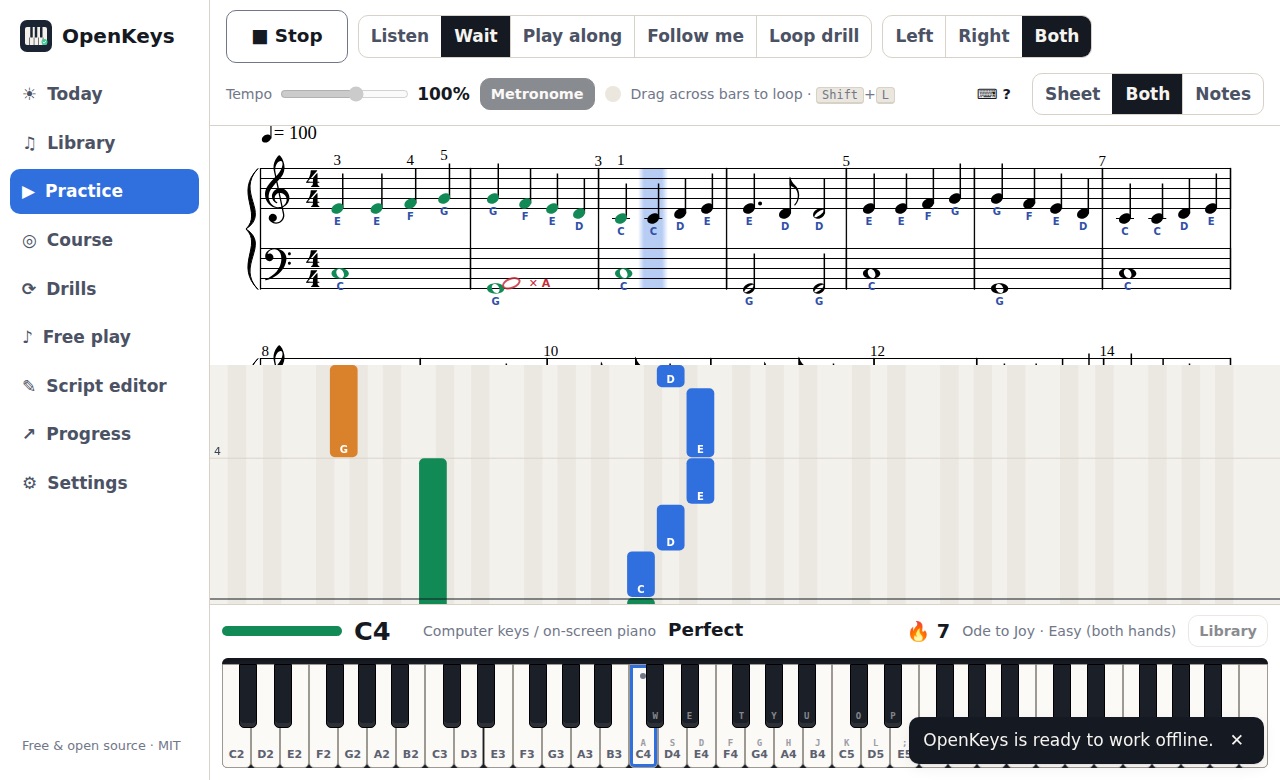
Simply Piano is a well-made app for phones and tablets that listens to you play and walks you through songs, with a subscription for most of its content. OpenKeys does the listening and the guidance for free, in the browser, on a laptop, tablet or phone.
There is no sign-up and no trial to cancel. Everything, from the course to the drills, is open from the first minute.
OpenKeys and Simply Piano side by side
| OpenKeys | Simply Piano | |
|---|---|---|
| Price | Free. No subscription, no ads, no in-app purchases | Subscription for full access; a few songs free |
| Account | Not needed | Needed |
| Where it runs | Any modern browser on a computer, tablet or phone; installs as an app | Phone and tablet app |
| Listens through a microphone | Yes, with a setup wizard for your room | Yes |
| MIDI keyboard | Yes, in Chrome, Edge and Firefox (Safari: microphone only) | Yes |
| Import your own files | Yes: MusicXML, MIDI and ABC | No, its own catalogue |
| Songs | 15 built-in public-domain pieces in graded versions, plus anything you import | Large licensed catalogue, including pop songs |
| Instruments | Piano and keyboard | Piano |
| Source code | Open source, MIT licence | Closed source |
| Your data | Audio and progress stay on your device | Account and progress stored by the service |
Compared in November 2026 from each app's public information. Prices and features change, so check their sites.
When OpenKeys is the better fit
- You want to learn piano without a subscription or a trial.
- You want to practise on a laptop or desktop browser, with a bigger view of the music.
- You want to import your own pieces as MusicXML, MIDI or ABC.
- You want detailed feedback: per-hand timing, a bar-by-bar heatmap and loops of the bars you miss.
When Simply Piano is the better fit
- Simply Piano has many more songs, including licensed pop music. OpenKeys has 15 public-domain pieces plus your imports.
- Simply Piano has a longer guided course. OpenKeys has a 7-lesson course plus generated drills.
What OpenKeys does
Listens through your microphone
Put a laptop or tablet on the music stand of any piano or keyboard. No cable needed. A setup wizard tunes it to your room in about 2 minutes.
Exact with a MIDI keyboard
Plug a USB MIDI keyboard into Chrome, Edge or Firefox and every note, its timing and how hard you played it are read exactly.
Waits for the right note
Wait mode stops until you play the right keys, then tells you what you played instead: "That was E4; try D4, 2 keys lower".
Falling notes and sheet music
Practise with sheet music, falling notes or both. Notes turn green or red in place, and wrong notes show as ghost noteheads.
Loops the bars you miss
Results show your top trouble spots bar by bar. One click loops them, and Loop drill raises the tempo 5% after each clean pass.
Your own music
Import MusicXML (from MuseScore), MIDI and ABC files by drag and drop, or write exercises in the built-in editor.
A course and drills
A 7-lesson course from finding middle C to playing with both hands, plus scales, arpeggios, chords, sight-reading, rhythm and ear training.
Free, with no account
No sign-up, no subscription, no ads and no trial. MIT licensed and open source on GitHub.
Private and offline
Audio never leaves your device. Your progress is stored in the browser, and OpenKeys installs as an app that works offline.
Questions
Is there a free Simply Piano alternative?
Yes. OpenKeys is free with no subscription. It listens through your microphone or MIDI keyboard and runs in the browser.
Does OpenKeys work on a laptop?
Yes. OpenKeys runs in Chrome, Edge, Firefox and Safari on Windows, macOS, Linux and ChromeOS, and on tablets and phones.
Is OpenKeys really free?
Yes. There is no subscription, no trial, no ads and nothing to unlock. The code is MIT licensed on GitHub, so it stays available even if the project stops.
Do I need to download anything or make an account?
No. Open openkeys.live in Chrome, Edge, Firefox or Safari and start playing. You can install it as an app from the browser if you want it offline.
Does it work with an acoustic piano?
Yes. OpenKeys listens through your device microphone. Single notes are detected precisely; for chords it checks the notes it expects. When it is not sure, it shows "?" and never counts that against you.
What do I need to start?
A piano or keyboard and a computer, tablet or phone. A USB MIDI cable is the most accurate. With no instrument at all, you can play with the computer keys.
Try it now
OpenKeys opens in your browser in a few seconds. No account, nothing to install.